— Open API

Connect Plugnotes to your tools, via JSON exchange.

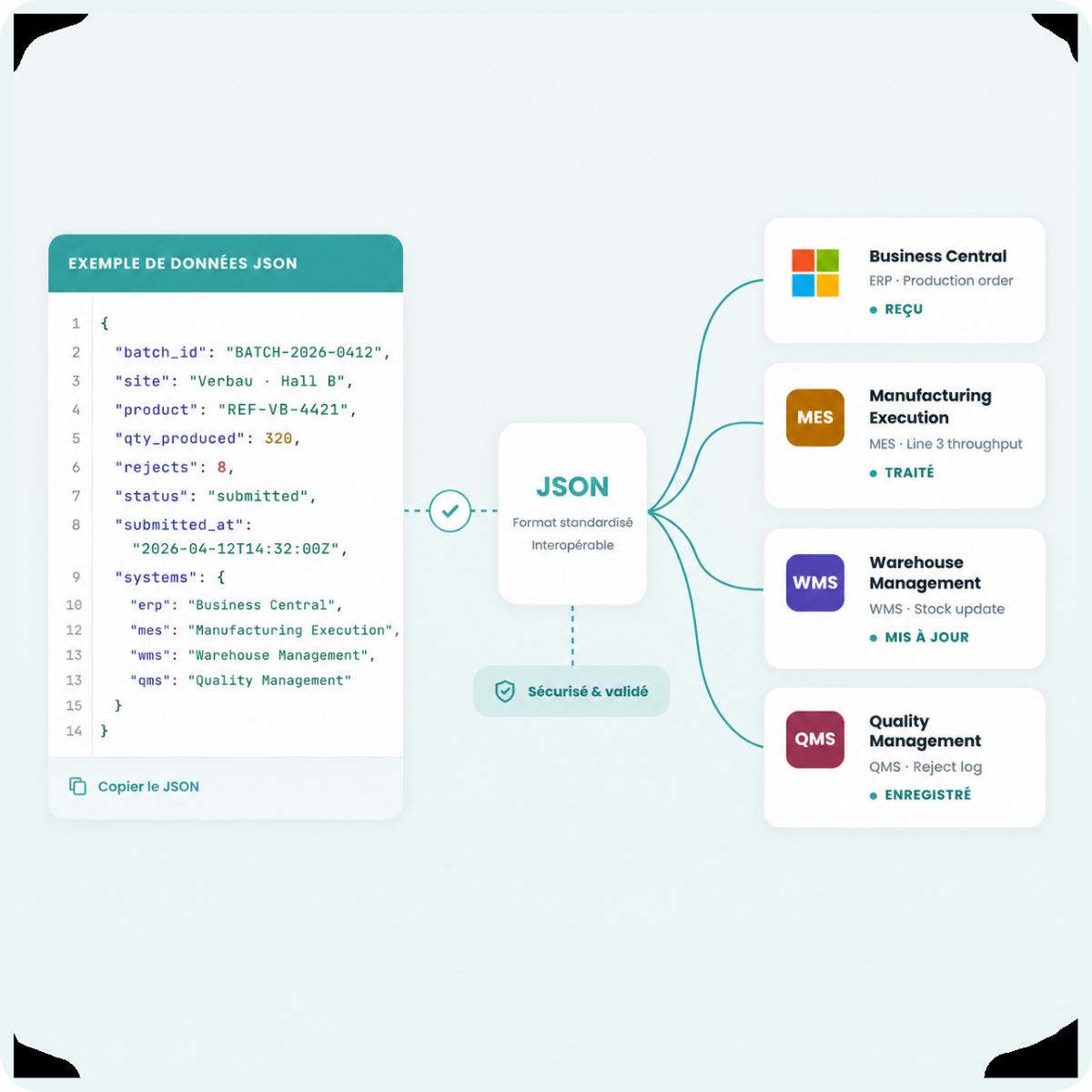
Everything happens through the exchange of structured JSON files. Each submitted Plugnote generates a standardized JSON that your system receives via webhook or retrieves via API. Simple, documented, compatible with any technical environment.

— Plugnotes & API

Why Plugnotes instead of a
custom development?

Developing your own field application with a custom API takes months and is expensive to maintain. Plugnotes provides the mobile app, field features, and the two JSON web services — you only implement the logic on your system's side.

01
No front-end to develop
You don't have to develop an iOS and Android mobile application, manage OS updates, or build offline mode. Plugnotes is the ready-to-use field mobile app. You only connect your back-end via two JSON endpoints.
02
Two simple JSON endpoints
XX13 — your system sends a JSON to Plugnotes to pre-fill a form. XX14 — Plugnotes sends a JSON to your endpoint after submission. Two documented HTTP calls, compatible with any language.
03
Native mobile application with full offline mode
Building offline mode into an in-house app is one of the most complex technical challenges. Plugnotes handles it natively. Your teams can input data in areas without connectivity, and the data is sent via XX14 as soon as they reconnect.
04
Included field features
Annotated photos, PDF generation, AI voice recognition, QR code, digital signature, role-based views and permissions — it's all in Plugnotes, included in the license. Your development team focuses solely on the business logic on your system's side.
05
Validated data before sending via XX14
Create multi-step workflows — field data entry, supervisor validation, office approval — before the XX14 JSON is sent to your system. Your ERP only receives reliable and complete data.
06
Compatible with all languages and systems
JSON is a universal standard. Java, .NET, Python, PHP, SAP, Odoo, Business Central, WMS — any system capable of sending or receiving an HTTP POST can connect to Plugnotes via XX13 and XX14. No proprietary libraries required.
— Integrations

Bouwsoft, Azure, Coachview
and many more.

Bouwsoft

ERP dedicated to the construction sector. Plugnotes site reports directly feed your Bouwsoft projects and work orders.

Azure

Store and process your Plugnotes data in Azure Data Lake or Azure SQL. Ideal for Microsoft environments that centralize their operational data.

Coachview

Training management platform. Attendance, evaluations, and certifications collected via Plugnotes are synchronized in Coachview without re-entry.

Logistics & WMS

Delivery notes, receiving discrepancies, stock statuses — connect Plugnotes to your WMS or TMS to fully digitize your dock operations.

— Benefits

An open API, documented and flexible.

Flovity-product-tools-icon
Comprehensive Swagger documentation : the Plugnotes API is documented in OpenAPI/Swagger format. Your developers can explore endpoints, test calls, and integrate in a few hours.
Flovity-product-tools-icon
Inbound and outbound webhooks : trigger actions in your systems as soon as a form is submitted or validated. And populate your Plugnotes forms from external events.
Flovity-product-tools-icon
Secure authentication : oAuth2 and API keys available. Every connection is authenticated and tracked. Compatible with the most demanding IT environments.
Flovity-product-tools-icon
Integration in a few hours: With clear documentation and available code examples, your developers can set up a first functional integration in just a few hours.
— How does it work?

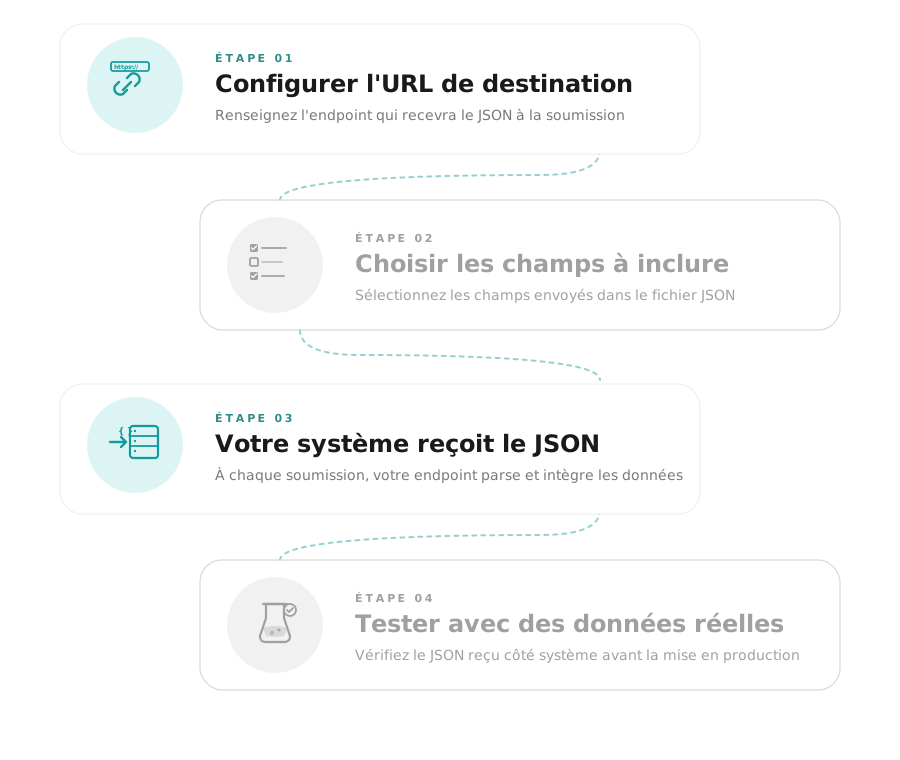
Connect Plugnotes to your system in a few steps.

01
Configure the destination URL in Plugnotes

Enter your system's endpoint that will receive the JSON. Triggered upon form submission or validation.

02
Choose fields to include

Select which Plugnotes form fields are included in the JSON file sent to your system.

03
Your system receives and processes the JSON

With each submission, Plugnotes sends a structured JSON file to your endpoint. Your system parses and integrates the data.

04
Test with real data

Submit a test form and verify the JSON received by your system before going live.
— How does it work?

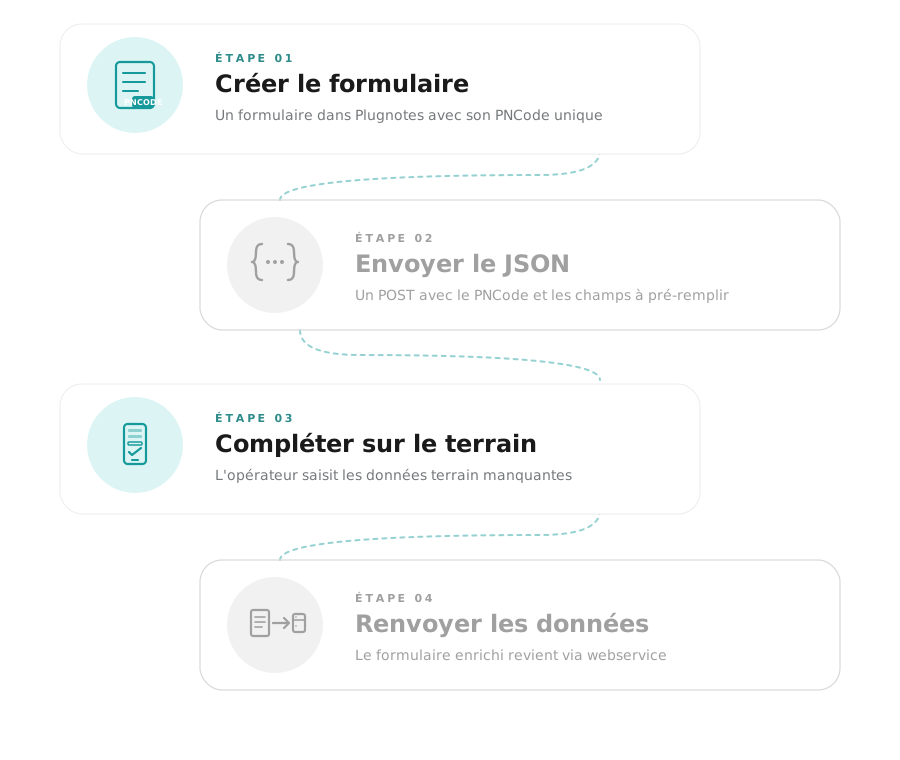
Connect your system to Plugnotes in a few steps.

01
Create a form in Plugnotes and note its PNCode

Each Plugnotes form has a unique identifier (pncode) visible in the settings.

02
Send a JSON to the Plugnotes XX13 endpoint

Your system sends a JSON POST with the pncode and the fields to pre-fill. The form opens with the data already present.

03
The operator completes the field entries

Your ERP data is already present in the form. The operator only needs to enter the missing field information.

04
The completed form returns via XX14

Once submitted, the form, enriched with field data, is sent back to your system via webservice XX14.

— Frequently Asked Questions

Everything you want to know about
the Plugnotes API

Is the Plugnotes API documented?

Yes. The Plugnotes API is documented in OpenAPI/Swagger format, available at help.plugnotes.com. All endpoints are described with their parameters, types, and response examples.

Can we receive Plugnotes data via webhook?

Yes. Plugnotes sends webhooks whenever a form is submitted, validated, or modified. You configure the destination URL from the Plugnotes interface, with no development required on the Plugnotes side.

Can the API populate a form's databases?

Yes. Via the API, you can push data into the connected lists and databases of your Plugnotes forms, from your ERP or any other system.

Can I test the API without a Plugnotes account?

Contact our team to access a test sandbox environment with demo data.

Ready to see Plugnotes in action on your field?

Create your first form in minutes, or let us show you how Plugnotes transforms your field operations into structured ERP data.