— Odoo Connector

Connect Plugnotes to Odoo. Natively.

Your field forms read and feed Odoo in real-time. Customers, items, inventory, interventions, everything synchronizes after validation, without re-entry, compatible with all Odoo versions.

— Plugnotes & Odoo

Plugnotes extends Odoo to the field

Odoo Studio and custom coding are development tools — even with AI assistance. Plugnotes is an operational field solution, designed for mobile teams. Here's what concretely changes.

01
No development, no Odoo Studio knowledge required
Odoo Studio requires technical mastery of the platform. Custom coding requires a developer, even with AI assistance. Plugnotes can be configured by anyone — without development, without risk of destabilizing your Odoo instance.
02
Zero risk of breaking your Odoo during updates
Odoo Studio customizations and custom coding developments can break during Odoo version upgrades. Plugnotes is external — its connector is maintained by Plugnotes, included in the license, and compatible with all versions.
03
Native mobile application with full offline mode
The Odoo mobile application does not work offline for field data entry. Plugnotes is a native mobile app: your teams can enter data in dead zones — construction sites, warehouses, rural areas — and the data synchronizes with Odoo as soon as they reconnect.
04
Native field functionalities missing from Odoo
All included in the Plugnotes license, without additional Odoo modules, without development. Odoo Studio cannot natively reproduce these field functionalities.
05
Data validated before entering Odoo
Create multi-step workflows with different forms, roles, and views. Data is only uploaded to Odoo when it is reliable and complete — a level of control that Odoo Studio does not easily allow for field teams.
06
Multiple Odoo tables combined on a single form
Place multiple Odoo tables on a single form — even tables not linked in Odoo. Exemple : un rapport d'intervention qui lit simultanément la fiche Client, la fiche Équipement et l'Ordre de travail, dans une seule vue pensée pour le technicien sur site.
— Use cases

When your Odoo ERP needs data from your teams Field

Intervention report in Odoo

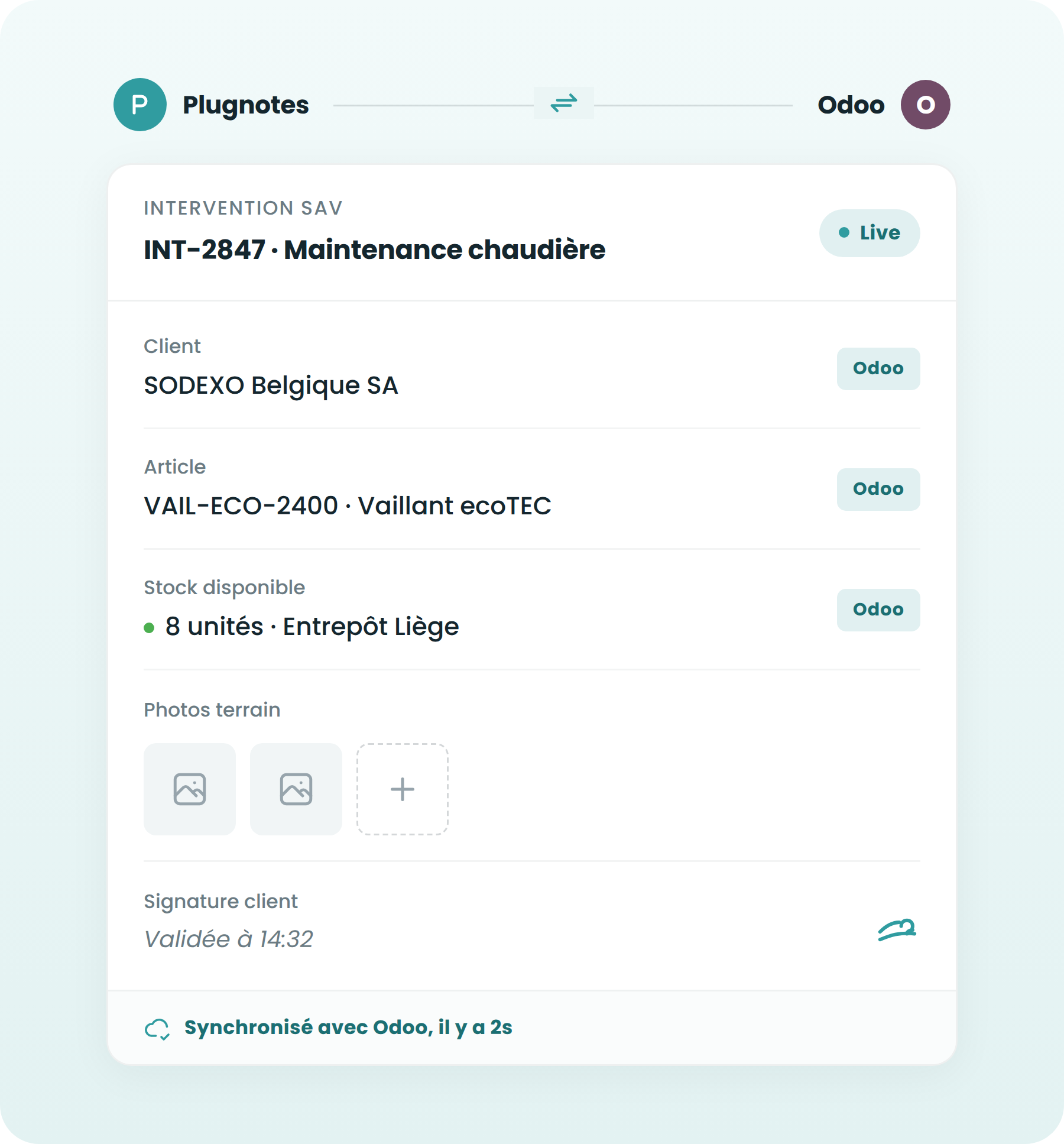
Your technician completes their report on a mobile device. The intervention is created directly in Odoo with photos and a signature, without needing to re-enter data at the office.

See use case →

Quality controls linked to Odoo products

Field quality controls are linked to Odoo item references. Non-conformities automatically create tickets in Odoo.

See use case →

Receiving anomalies to Odoo

A damaged package upon receipt? The operator records the anomaly in Plugnotes, and a debit note is automatically created in Odoo.

See use case →

Connected production monitoring

Every machine stop, non-conformity, or batch end is recorded on a tablet and instantly uploaded to your Odoo production module.

See use case →

Work orders and site receipts

Your field teams complete their work orders via Plugnotes. Work orders are updated in Odoo upon validation.

See use case →

Digitalized supplier exchanges

Your suppliers fill out Plugnotes forms via a link. The data arrives in Odoo without intervention from your team.

See use case →

— Benefits

What you gain by connecting Plugnotes to Odoo.

Flovity-product-tools-icon
Bidirectional synchronization : Plugnotes reads your Odoo customers, items, and suppliers to populate your forms. And it sends field-collected data directly to the correct Odoo tables.
Flovity-product-tools-icon
Maintenance included in the license : connector updates are provided by Plugnotes. Compatible with all Odoo versions and no technical intervention required on your part.
Flovity-product-tools-icon
No Odoo development required : the connection is configured from the Plugnotes interface. No modifications to your Odoo instance, no third-party modules to install.
Flovity-product-tools-icon
Mobile and offline: your teams can input data even without a network connection. Data is uploaded to Odoo upon validation, whether they are in a dead zone or on a job site.
— How it works

Connect Plugnotes to Odoo
in a few steps.

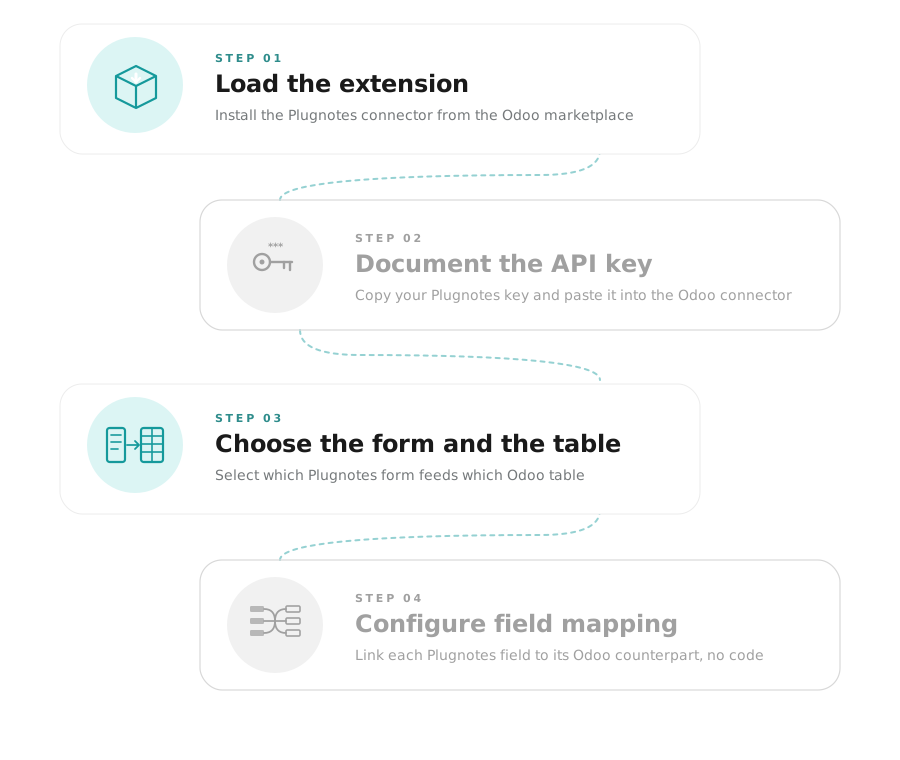
01
Load the Plugnotes extension

Install the Plugnotes connector from the Odoo marketplace. No development required.

02
Enter the Plugnotes API key

Copy your API key from Plugnotes settings and enter it into the Odoo connector.

03
Choose the Plugnotes form and Odoo table

Select which Plugnotes form feeds which table in your Odoo (customers, items, interventions...).

04
Map the fields

Link each field in your Plugnotes form to the corresponding field in Odoo. Visual, no code.
— How it works

Connect Odoo to Plugnotes
in a few steps.

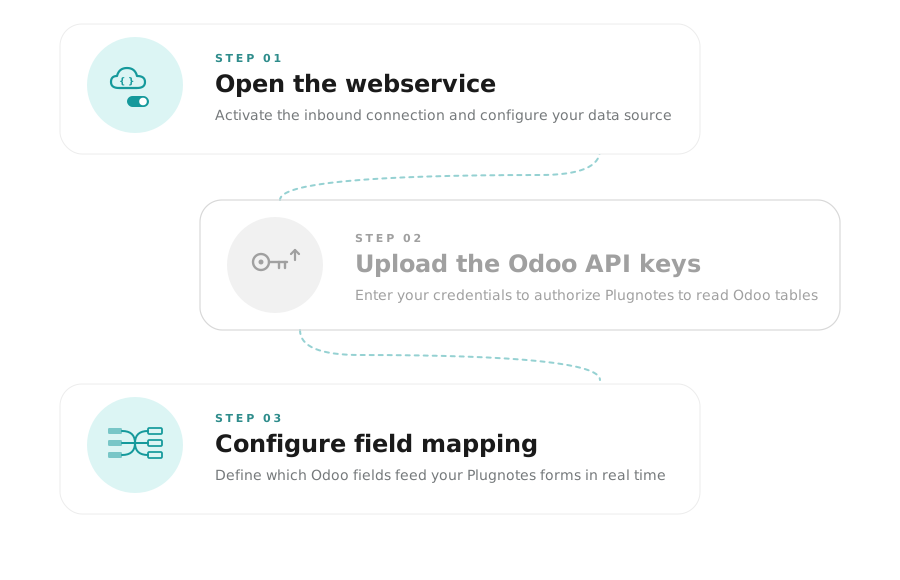
01
Open the webservice in Plugnotes

From Plugnotes, activate the incoming connection and configure the data source (customers, items, suppliers...).

02
Upload Odoo API keys to Plugnotes

Enter your Odoo credentials in the Plugnotes connection settings to authorize table reading.

03
Configure field mapping

Define which Odoo fields feed which fields in your Plugnotes forms. Data is available in real-time during entry.

— Partners

Deployed by experts
near you.

Odoo Integrators -  CERTIFIED

Odoo Integrators -  CERTIFIED

Odoo Integrators -  CERTIFIED

Odoo Integrators -  CERTIFIED

Odoo Integrators -  CERTIFIED

Let's discuss your project
Does your company use Odoo? Let's discuss your current project and challenges and see how integration with Plugnotes can help you.
— Frequently Asked Questions

Everything you want to know about the Plugnotes & Odoo connection

Which Odoo versions are compatible with Plugnotes?

Plugnotes is compatible with the latest version of Odoo SH. Connector maintenance is included in your Plugnotes license.

Do I need to modify my Odoo instance to connect Plugnotes?

No. The connector requires no modifications to your Odoo instance. Configuration is done entirely from the Plugnotes interface.

Can Odoo data (customers, items) be read from a Plugnotes form?

Yes. Your forms can be directly connected to Odoo tables: customers, items, suppliers, equipment. The operator selects a record, and the fields are automatically populated.

Is synchronization real-time?

Data is sent to Odoo when the form is submitted in Plugnotes. Reading from Odoo databases is real-time within the form.

Ready to see Plugnotes in action on your field?

Create your first form in minutes, or let us show you how Plugnotes transforms your field operations into structured ERP data.