— Middleware

Connect Plugnotes and your ERP via a middleware.

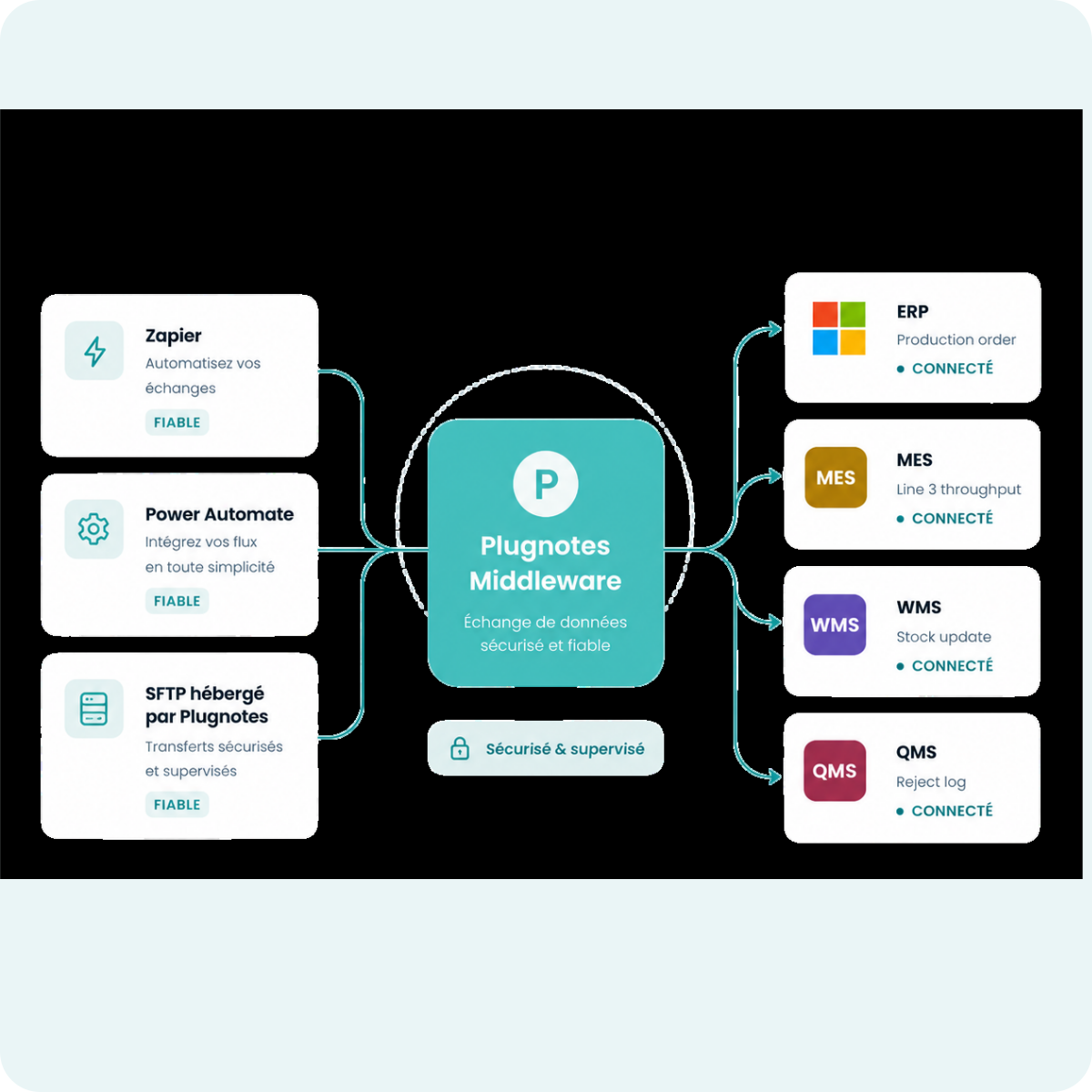
When a direct API connection is not possible or desired, Plugnotes integrates via a middleware of your choice. Zapier, Power Automate, or SFTP hosted by Plugnotes : data exchange remains reliable, without direct network opening on your side.

— Plugnotes & Middleware

Why Plugnotes instead of a
homegrown or manual integration ecosystem?

Many companies cobble together import/export scripts or continue using Excel. Plugnotes + middleware offers the robustness of a maintained solution, field features that no script can match, and a turnkey SFTP infrastructure.

01
SFTP hosted and managed by Plugnotes
No SFTP server to install, configure, or maintain. Plugnotes hosts the server, generates the files, and uploads them automatically. Your ERP connects and imports. Zero IT intervention.
02
CSV, XML, JSON generated directly in Plugnotes
After a form submission, Plugnotes automatically generates the file in the format expected by your ERP. No external transformation, no conversion script to maintain.
03
Native mobile application with full offline mode
Your teams input data without a connection — on a construction site, in a warehouse, or in a dead zone. Data synchronizes and the file is uploaded to the SFTP as soon as reconnected. No in-house integration offers this out-of-the-box.
04
Native field features
An import/export script cannot capture annotated photos, generate a PDF, or manage role-based permissions. Plugnotes does this natively, included in the license.
05
Validated data before sending to your ERP
Create multi-step workflows — different forms, roles, and validation views. The file is only generated and sent to your ERP when the data is reliable and complete. This is impossible to reproduce with a simple Excel export.
06
Compatible with any ERP, even without an exposed API
SAP, Sage, legacy WMS, custom ERP without REST API — if your ERP can read a CSV, XML, or JSON file from an SFTP, Plugnotes can feed it. No other field tool offers you this universal compatibility without development.
— Advantages

Why middleware can be the good solution?

Flovity-product-tools-icon
Uncompromising security : no direct network access to your ERP. Data transits via your controlled middleware, according to your IT rules.
Flovity-product-tools-icon
Universal compatibility : works with any ERP, even without an API. SAP, Sage, legacy WMS, in-house solutions: everything can receive Plugnotes data.
Flovity-product-tools-icon
Quick setup : Zapier and Power Automate can be set up without development. Plugnotes SFTP can be activated without IT intervention.
Flovity-product-tools-icon
Maximum flexibility: transform, filter, and route your Plugnotes data to multiple destinations simultaneously, with your middleware's own logic.
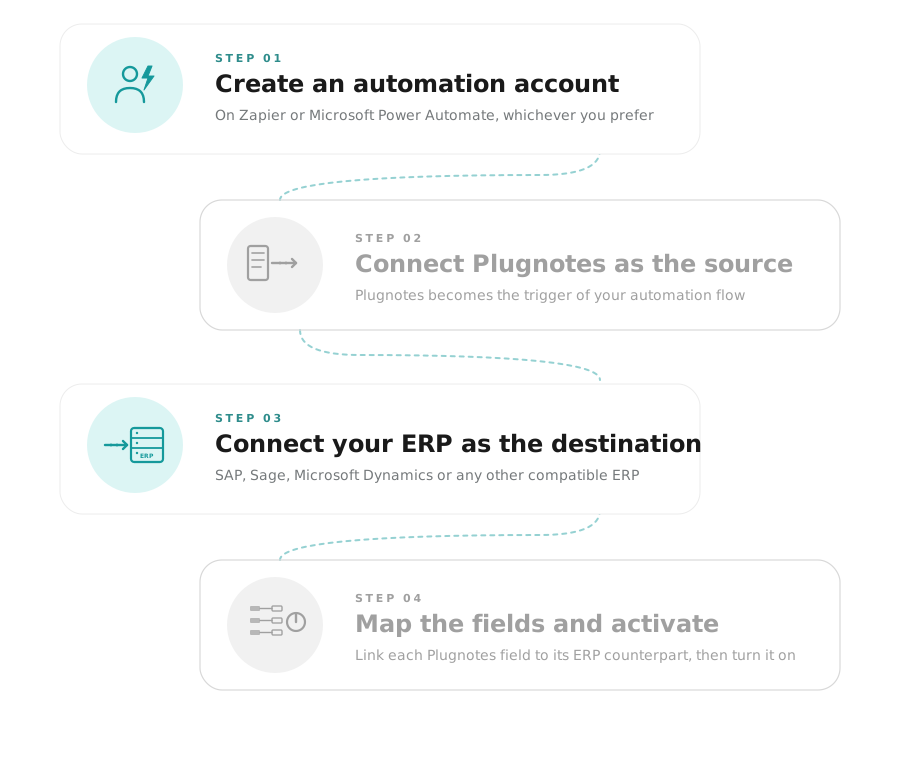
— Option A

Connect Plugnotes to your ERP via Zapier or Power Automate

01
Create a Zapier or Power Automate account
02
Connect Plugnotes as a source
03
Connect your ERP as a destination
04
Map the fields and activate the connection
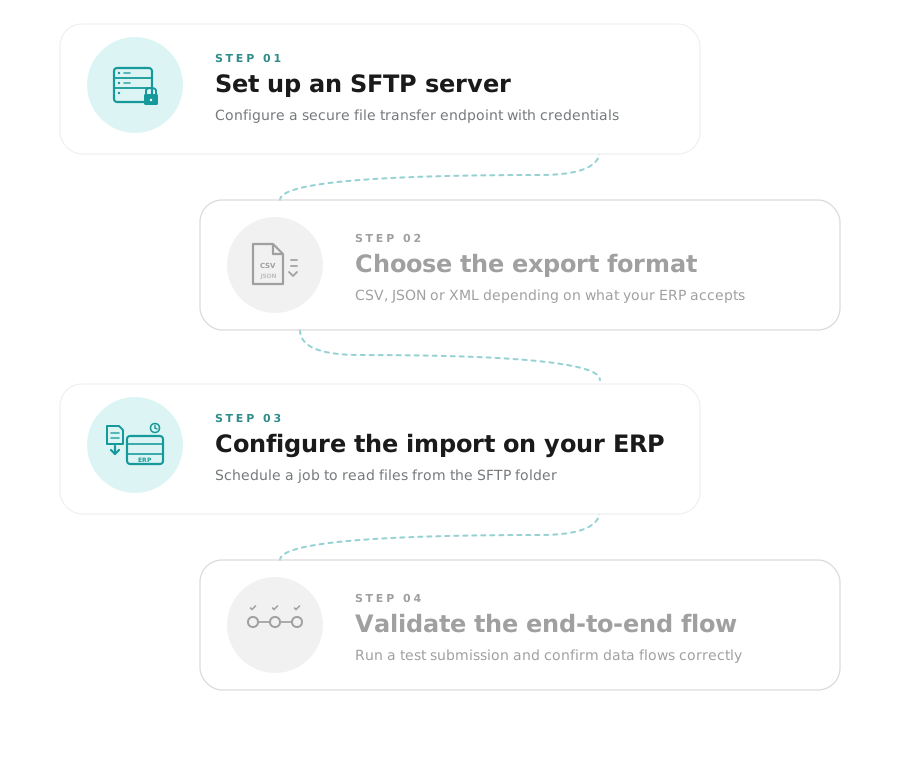
— Option B

Connect Plugnotes to your ERP via SFTP hosted by Plugnotes

01
Configure an SFTP server
02
Choose the export format in Plugnotes
03
Configure the import into your ERP
04
Validate the end-to-end flow
— Frequently Asked Questions

Everything you want to know about middlewares

What is the difference between a direct API connection and middleware?

A direct API connection links Plugnotes to your ERP without an intermediary — fast and real-time. Middleware adds an intermediate layer (Zapier, Plugnotes SFTP, SFTP) that can transform, filter, or route data. Middleware is preferable when your ERP does not have an accessible API or when your IT policy imposes network restrictions.

Can Plugnotes send files to an SFTP server (FileZilla)?

Yes. Plugnotes can export your validated data to an SFTP server in CSV, XML, or JSON format. Your ERP then imports them according to its own schedule. This is the recommended solution for ERPs without APIs or restrictive IT environments.

Are Zapier and Power Automate supported?

Yes. Plugnotes has native connectors for Zapier and Power Automate. You can trigger actions in over 5,000 applications as soon as a form is validated in Plugnotes, without any development.

Do you need a developer to set up an integration via middleware?

For Zapier and Power Automate, no — setup is visual. For Plugnotes SFTP, setup is guided, or you can contact our certified integration partners.

Ready to see Plugnotes in action on your field?

Create your first form in minutes, or let us show you how Plugnotes transforms your field operations into structured ERP data.