— Order forms

Plugnotes, the software for digital order forms connected to your ERP.

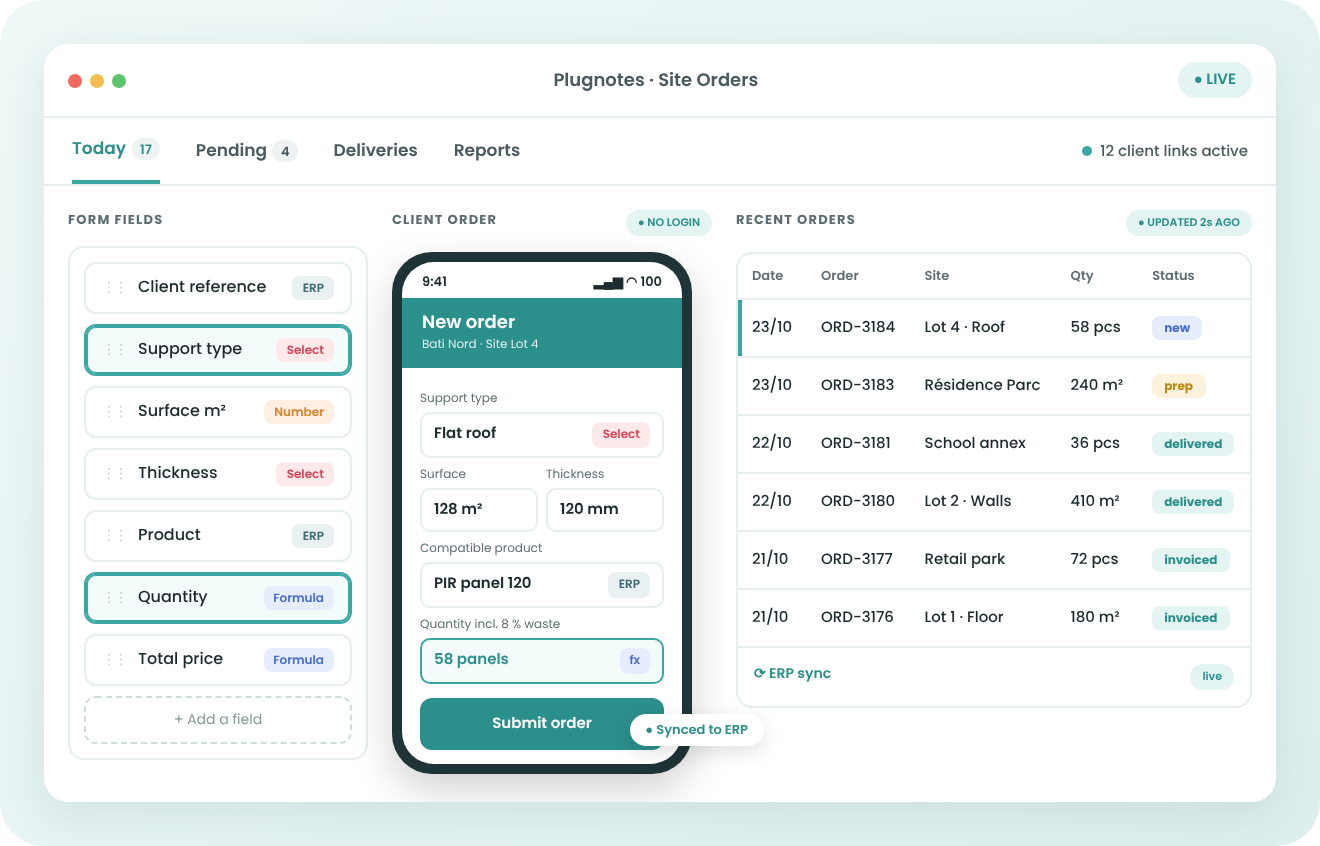
Your customers order through a form that calculates quantities, suggests the items that fit their project and applies their contract. The data goes straight into your ERP, with no re-entry. No IT development needed.

Formulaire de bon de commande digital Plugnotes avec calcul de surface et produits compatibles
— need

Why digitalise your
order forms?

Inbox3 new
Order request · Site Lot 4
From: Bati Nord
Hi, we need insulation for the flat roof, about 128 m². Which panel do you advise? Same discount as last time please.
plan_lot4.pdfphoto_roof.jpg
01
Quote draft
128 m² ÷ 2.88 = 44 panels ?
PIR 120 mm → PIR 100 mm ?
discount: 8 % ? 12 % ?
+ waste ??
02
ERP · Sales orderManual entry
CustomerBati Nord
ItemPIR panel 100 mm
Quantity44
Discount8 %
Wrong item and quantity
Site Lot 4 · Delivery
Panels too thin, 14 missing
Installation team waiting. Order re-entered from scratch.
03
01
Orders received by email, phone or PDF

Every order has to be read and keyed into the ERP again. One reference copied wrong and the whole chain carries the error forward.

02
Technical orders prepared by hand

Surfaces to calculate, items to choose by substrate, dimensions or type of installation, prices and discounts to apply: every order needs expertise the customer doesn't always have. A calculation error or the wrong item only shows up on site or at invoicing.

03
Ordering and execution are disconnected

Once the order is entered, the team carrying it out starts from scratch. Customer information doesn't follow through to the end result.
— how it works

Create, collect, share & analyze
without development.

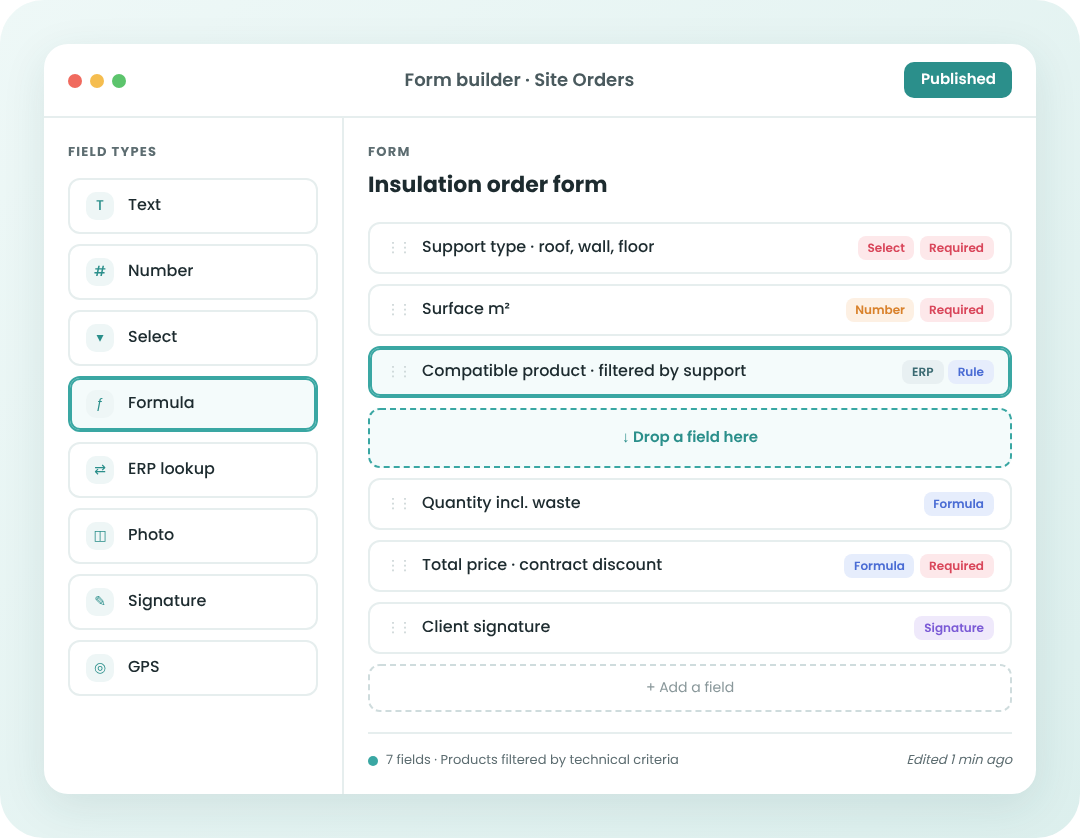
Création d'un formulaire de commande avec formules de calcul dans Plugnotes
01

Build an order form fed by your ERP

Items, services and prices are read directly from your ERP. Add conditional fields and calculation formulas (surfaces, quantities, amounts) in a few clicks.

02

Your customers order without a Plugnotes account

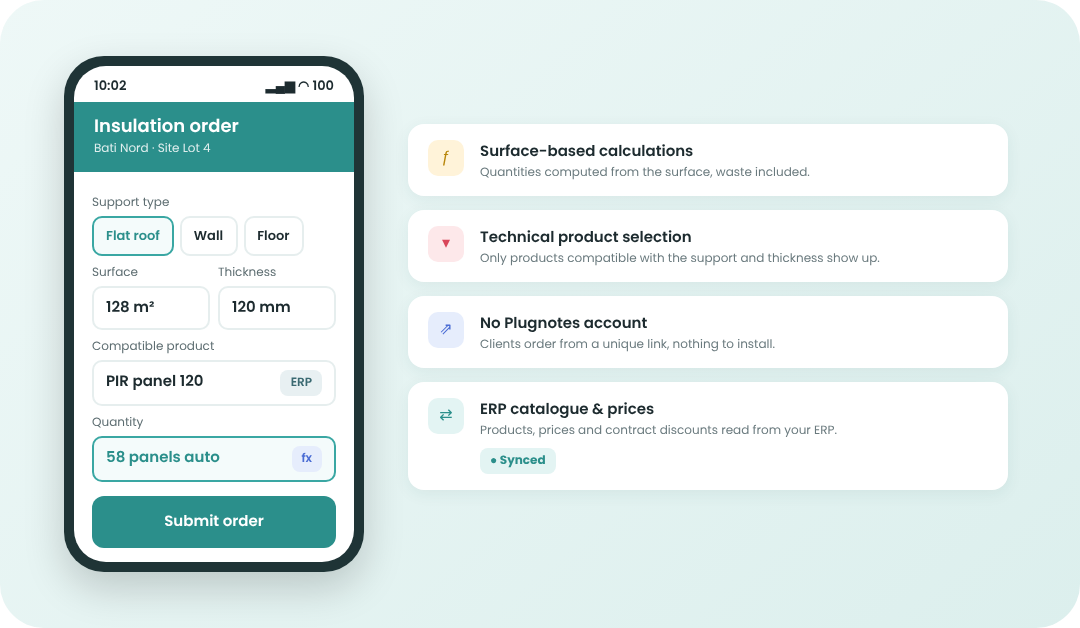
Each customer gets a unique link or reference. The form guides them: they enter their measurements, quantities are calculated, and only the items that fit their project and contract appear.

Commande sur mobile avec sélection d'articles selon le type de support
03

The order triggers the next step

A validated order automatically fills in the form for the next step: preparation, delivery, installation. Your teams get all the customer data without re-entering it.

04

The data flows straight into your ERP

Order, quantities and amounts are created in Odoo, Business Central or any other connected tool. Invoicing starts from accurate data.

— Why Plugnotes

What Plugnotes brings to your
order forms

01
A form tailored to each customer
A unique reference filters the authorised services and applies the negotiated discounts. No more out-of-contract orders.
02
Technical calculations and guided selection
The customer enters a surface and the quantity of materials is calculated. They specify the substrate or type of installation, and only compatible items are offered.
03
No licence for your customers
Your customers order from a simple link, without installing an app or creating an account.
04
Ease of use
Accessible to everyone, internal and external, regardless of skill level. Your field teams get started with Plugnotes in minutes.
05
Rapid setup
Implementation and customization without IT development. Operational in a few days — without the help of your IT department.
06
Offline mode
Your teams access Plugnotes without network or internet connection. Data automatically syncs upon reconnection.
07
Unlimited integrations
Plugnotes integrates with any business application — ERP, CRM, WMS. Via no-code connector, API, or Zapier. Field data automatically feeds your systems.
08
100% custom solution
A no-code solution that adapts to any specific business process. Choose your fields, workflows, templates — in a few clicks.
09
Centralized and actionable data
All your field data is automatically centralized, traceable, and ready for analysis. Dashboards, CSV exports, customized PDFs.
— customers

Companies using Plugnotes
for their order forms.

Stonefish

Quality Management

Let's talk about your project
Want to digitalise your order forms? Let's talk about your project and current challenges and see how Plugnotes can help.
— Integrations

Connect your order forms to
your ERP

Odoo Connector
Your forms are populated and update records directly in Odoo — customers, items, inventory, interventions. No middleware, no complex configuration.

✓ Read Odoo customers and items
✓ Automatic creation of tickets, orders
✓ Bidirectional synchronization
✓ Compatible with Odoo SH

Learn more →

Business Central Connector
Full integration with Microsoft Business Central. Receipts, interventions, quality, synchronized with your Business Central without delay, cloud or on-premise.

✓ Native connection to Business Central tables
✓ Update customer and item records
✓ Automatic Business Central document creation
✓ Compatible with Business Central cloud and on-premise

Learn more →

Open API
Is your ERP not Odoo or Business Central? Plugnotes integrates via REST API, webhooks, and Zapier.

✓ Documented REST API
✓ Inbound and Outbound Webhooks
✓ Zapier

Learn more →

Le guide du bon de commande digital dans la construction

13 pages pour construire un bon de commande qui arrive juste dans votre ERP.

Télécharger le guide
Guide du bon de commande digital dans la construction
— Frequently Asked Questions

Everything you want to know about digital order forms

What is a digital order form?

A digital order form is an online form that replaces the paper form or the email. The customer selects products or services, and the data is sent automatically to the supplier and its ERP.

Do my customers need a Plugnotes account?

No. They order through a unique link or reference, with no account or installation.

Can the form suggest the right items based on technical criteria?

Yes. Depending on the customer's answers (substrate, dimensions, use), the form only shows compatible items from your ERP catalogue. Surfaces, quantities and totals are calculated as they type.

Do orders reach our ERP?

Yes. They are created in Odoo, Business Central or any ERP connected via API, and can automatically trigger the form for the next step.

Ready to see Plugnotes in action on your field?

Create your first form in minutes, or let us show you how Plugnotes transforms your field operations into structured ERP data.